1. Install Environment
* OS : CentOS 7.9
* Engine : PostgreSQL 15.1
2. Install Procedure
1) OS Parameter Modify
(1) limits.conf 수정
[root@localhost /]$ vi /etc/security/limits.conf

-- 아래의 내용을 추가합니다.

# PostgreSQL Install
postgres soft nofile 65535
postgres hard nofile 65535
- 해당 OS 파라미터를 수정하지 않고 그냥 운영 시, Getting too many open files error for Postgres 오류가 발생할 수 있습니다.
- 이를 방지하기 위해 limits 값을 설정합니다.
- 단순 Install TEST를 위한 목적이라면 상기의 OS 파라미터를 넣지 않아도 되지만, 서비스 단계를 고려하신다면 추가하셔야 합니다.
(2) sysctl.conf 수정
[root@localhost /]$ vi /etc/sysctl.conf

-- 아래의 내용을 추가합니다.

fs.file-max=65535


-- 추가 후 아래의 명령어를 통해 적용 여부를 확인합니다.

[root@localhost /]$ sysctl -p
fs.file-max=65535
- 해당 OS 파라미터를 수정하지 않고 그냥 운영 시, Getting too many open files error for Postgres 오류가 발생할 수 있습니다.
- 이를 방지하기 위해 sysctl 값을 설정합니다.
- 단순 Install TEST를 위한 목적이라면 상기의 OS 파라미터를 넣지 않아도 되지만, 서비스 단계를 고려하신다면 추가하셔야 합니다.
2) Package 설치
[root@localhost /] yum -y install glibc make gcc gcc-c++ readline readline-devel \
zlib zlib-devel autoconf openssl openssl-devel uuid gettext gettext-devel
python python-devel postgresql-libs pgagent
- EDB Requirements와 PostgreSQL15 Requirements에서 발췌했습니다. 바로가기
3) OS유저 생성
[root@localhost /]$ groupadd postgres
[root@localhost /]$ useradd -g postgres -d /postgres postgres
[root@localhost /]$ passwd postgres
- 유저명 : postgres
- 그룹명 : postgres
- 디렉토리 : /postgres
4) .bash_profile 수정
[postgres@localhost ~]$ vi .bash_profile

-- 아래의 내용 추가 후 저장합니다.

export PG_HOME=/postgres/pgsql
export PATH=$PG_HOME/bin:$PATH
export PGLIB=$PG_HOME/lib
export PGDATA=$PG_HOME/data
export MANPATH=$MANPATH:$PG_HOME/man
export LD_LIBRARY_PATH=/postgres/pgsql/lib


-- .bash_profile 적용시킬 겸 디렉토리 생성을 위해 root 유저로 나가기

[postgres@localhost ~]$ exit


-- 만약,  .bash_profile만 적용시키고 싶다면 아래의 명령어 입력

[postgres@localhost ~]$ . .bash_profile
- PG_HOME에 PostgreSQL 엔진 경로 설정
- PGDATA는 실제 데이터 (테이블스페이스 등)가 저장되는 영역이 아닙니다.
- postgresql.conf, pg_hba.conf 와 같은 파일들이 저장되는 영역입니다.
5) 디렉토리 생성
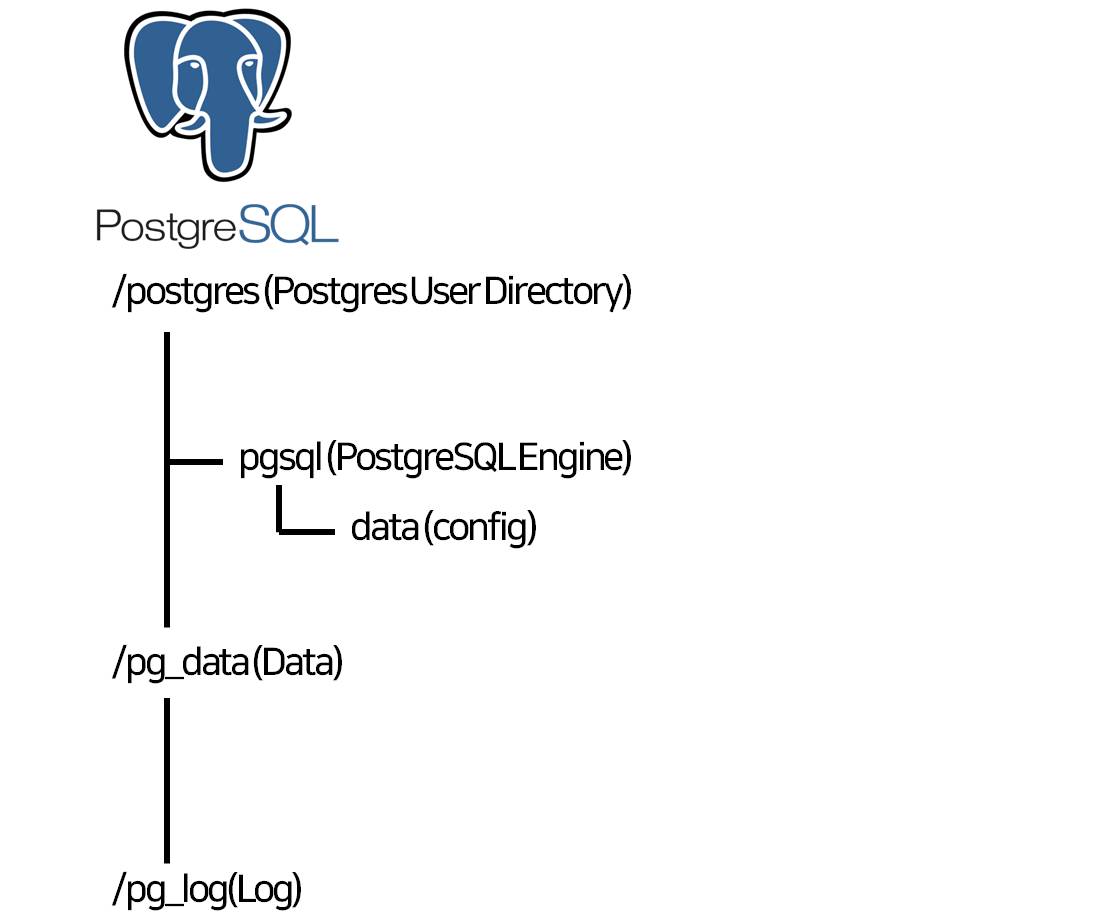
- postgres 유저 디렉토리 : /postgres
- PG_HOME : /postgres/pgsql
- PGDATA : /postgres/pgsql/data
- DATA : /pg_data
- LOG : /pg_log
[root@localhost /]$ mkdir /pg_data
[root@localhost /]$ mkdir /pg_log
[root@localhost /]$ chown postgres:postgres /pg_data
[root@localhost /]$ chown postgres:postgres /pg_log

[root@localhost /]$ su - postgres
[postgres@localhost ~]$ mkdir -p /postgres/pgsql
[postgres@localhost ~]$ mkdir -p /postgres/pgsql/data
[postgres@localhost ~]$ mkdir -p /postgres/pgsql/man
6) PostgreSQL Source Unzip
[postgres@localhost ~]$ tar -xvf postgresql-15.1.tar.gz- PG_HOME 경로에 압축 해제하실 필요 없습니다.
- Source Tree 구성 후 Build 할 때 prefix로 PG_HOME 경로를 지정하게 됩니다.
7) Source Tree 구성
[postgres@localhost ~]$ cd postgresql-15.1
[postgres@localhost postgresql-15.1]$ ./configure --prefix=/postgres/pgsql --enable-depend
--enable-nls=utf-8 –with-openssl --with-ossp-uuid
[(optional) --with-python --with-perl --with-systemd]
- prefix : PostgreSQL HOME (PG_HOME) 경로입니다.
- --enable-depend : makefile 셋업. 헤더파일 변경 시 영향을 받는 모든 오브젝트 리빌드합니다.
- --enable-nls : NLS 활성화. 이를 통해 메시지들이 영어가 아닌 언어로 표시되게끔 합니다.
언어코드 목록은 공백으로 구분합니다. (ex. --enable-nls='ko kr')
목록을 지정하지 않는 경우 모두 설치됩니다.
(이 옵션을 사용하기 위해서는 gettext 패키지 필요)
- --with-python : python을 사용할 수 있도록 합니다.
(이 옵션을 사용하기 위해서는 python, python-devel 패키지 필요)
- --with-openssl : SSL 통신을 사용할 수 있도록 합니다.
(이 옵션을 사용하기 위해서는 openssl, openssl-devel 패키지 필요)
(2023-06-28 내용 추가 - PG_AUTO_FAILOVER를 사용하기 위해서는 openssl을 포함하셔야 합니다.)
- --with-ossp-uuid : ossp-uuid extension을 사용할 수 있도록 합니다.
- --with-perl : perl을 사용할 수 있도록 합니다. (이 옵션을 사용하기 위해서는 perl 패키지 필요)
- --with-systemd : RHEL7 이상에서 systemd를 이용하여 PostgreSQL 서비스를 기동/중지할 수 있습니다.
(해당 옵션을 사용할 경우, systemd 경로에 스크립트를 따로 추가하셔야 합니다.)
(해당 문서에서는 pg_ctl을 통해 엔진을 기동할 것이므로, systemd 옵션은 생략합니다.)
8) Source Build
[postgres@localhost postgresql-15.1]$ make world
[postgres@localhost postgresql-15.1]$ make install-docs
[postgres@localhost postgresql-15.1]$ make install-world
- make 옵션과 make world 옵션은 구분 할 필요가 있습니다
* make : configure에서 설정한 내용만 빌드
* make world : docs를 포함한 전체 빌드
- make world로 빌드할 경우 라이브러리 (contrib)가 모두 포함된 상태로 설치할 수 있습니다.
- 추후 extension을 추가할 때 골치아픈 상황을 줄이기 위해 전체 빌드를 권장합니다.
9) PostgreSQL 초기설정 (initdb)
[postgres@localhost ~]$ cd $PG_HOME/bin
[postgres@localhost bin]$ ./initdb -E utf-8 -D /postgres/pgsql/data
- -E: 캐릭터 셋 지정
- -D: PGDATA 디렉토리 지정
(conf 파일 등이 저장되는 경로)
10) postgresql.conf 파일 수정
[postgres@localhost data]$ vi $PG_HOME/data/postgresql.conf


# - Connection Settings -

listen_addresses = '*'          # what IP address(es) to listen on;
                                        # comma-separated list of addresses;
                                        # defaults to 'localhost'; use '*' for all
                                        # (change requires restart)
port = 5432                             # (change requires restart)
max_connections = 100                   # (change requires restart)


log_destination = 'stderr'                      # Valid values are combinations of
                                                # stderr, csvlog, jsonlog, syslog, and
                                                # eventlog, depending on platform.
                                                # csvlog and jsonlog require
                                                # logging_collector to be on.
                                                # This is used when logging to stderr:
logging_collector = on                          # Enable capturing of stderr, jsonlog,
                                                # and csvlog into log files. Required
                                                # to be on for csvlogs and jsonlogs.
                                                # (change requires restart)
                                                # These are only used if logging_collector is on:
log_directory = '/pg_log'                       # directory where log files are written,
                                                # can be absolute or relative to PGDATA
log_filename = 'postgresql-%Y-%m-%d_%H%M%S.log' # log file name pattern,
                                                # can include strftime() escapes
#log_file_mode = 0600                           # creation mode for log files,
                                                # begin with 0 to use octal notation
log_rotation_age = 30d                          # Automatic rotation of logfiles will
                                                # happen after that time. 0 disables.
log_rotation_size = 10MB                        # Automatic rotation of logfiles will
                                                # happen after that much log output.
                                                # 0 disables.
- postgresql.conf 파일을 적절히 수정합니다.
- 해당 문서에서는 /pg_log 디렉토리에 로그가 쌓이도록 설정을 변경합니다.
- 로그 파일이 저장될 경로, 로그 파일 명, 로테이션 크기 및 기간 등을 설정 후 저장합니다.
11) pg_hba.conf 수정
[postgres@localhost data]$ vi $PG_HOME/data/pg_hba.conf

-- 아래의 내용을 추가

# "local" is for Unix domain socket connections only
local   all             all                                     trust
# IPv4 local connections:
host    all             all             127.0.0.1/32            trust
host    all             all             0.0.0.0/0               trust
host    all             all             all                     trust
# Allow replication connections from localhost, by a user with the
# replication privilege.
local   replication     all                                     trust
host    replication     all             127.0.0.1/32            trust
host    replication     all             ::1/128                 trust
12) PostgreSQL15 기동
[postgres@localhost ~]$ pg_ctl start -D /postgres/pgsql/data
13) psql을 통한 PostgreSQL 진입 및 초기 패스워드 설정
[postgres@localhost ~]$ psql -d postgres
psql (15.1)
Type "help" for help.
postgres=# \password postgres


postgres=# \q